> ## Documentation Index
> Fetch the complete documentation index at: https://dacruzdev.mintlify.site/llms.txt
> Use this file to discover all available pages before exploring further.
# Take a Single High-Resolution Screenshot in ScreenshotKit
> Capture a high-resolution still from one camera for marketing, store assets, debugging, or documentation, with supersampling up to 8x.
Use this when you want a high-resolution still from one camera: marketing shots, store assets, debugging, or documentation.
 ## Steps
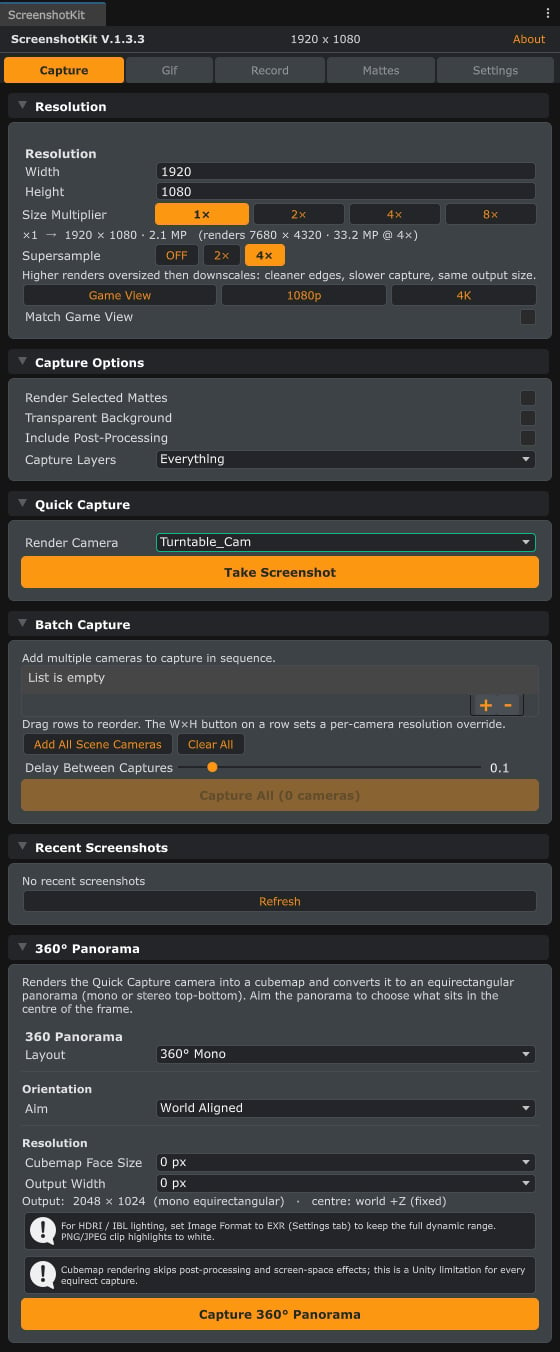
In the ScreenshotKit window, click the **Capture** tab.
Under **Resolution**, set width and height, or click a preset such as **1080p**, **4K**, or **Game View**. Optionally raise **Size Multiplier** (1x to 8x) for supersampled output.
Under **Capture Options**, toggle **Transparent Background** if you want an alpha channel, and pick a **Capture Layers** mask if you want to exclude layers.
Click **Take Screenshot**, or press **Ctrl+Shift+S** from the Game View, or **Ctrl+Shift+Alt+S** from the Scene View.
## Result
A single image file saved to your **Save Location**. The filename is built from your filename template (camera name, timestamp, resolution, prefix, suffix; see [Filename Format](/configuration/filename-format)).
The **Game View** preset matches your current Game View aspect and resolution.
Size Multiplier renders at `width x multiplier` by `height x multiplier` and writes the supersampled result. Use it for crisp 8K stills without changing your scene's display resolution.
Combined width x height x multiplier squared must stay within the roughly **132.7 megapixel** budget, which is Full HD at 8x (15360 x 8640). Anything larger is rejected up front with a clear log message. See [Troubleshooting](/reference/troubleshooting).
## See also
* [Runtime API: single capture](/api/capture) to drive captures from your own scripts.
* [Batch Capture](/workflows/batch-capture) to shoot every camera in the scene at once.
## Steps
In the ScreenshotKit window, click the **Capture** tab.
Under **Resolution**, set width and height, or click a preset such as **1080p**, **4K**, or **Game View**. Optionally raise **Size Multiplier** (1x to 8x) for supersampled output.
Under **Capture Options**, toggle **Transparent Background** if you want an alpha channel, and pick a **Capture Layers** mask if you want to exclude layers.
Click **Take Screenshot**, or press **Ctrl+Shift+S** from the Game View, or **Ctrl+Shift+Alt+S** from the Scene View.
## Result
A single image file saved to your **Save Location**. The filename is built from your filename template (camera name, timestamp, resolution, prefix, suffix; see [Filename Format](/configuration/filename-format)).
The **Game View** preset matches your current Game View aspect and resolution.
Size Multiplier renders at `width x multiplier` by `height x multiplier` and writes the supersampled result. Use it for crisp 8K stills without changing your scene's display resolution.
Combined width x height x multiplier squared must stay within the roughly **132.7 megapixel** budget, which is Full HD at 8x (15360 x 8640). Anything larger is rejected up front with a clear log message. See [Troubleshooting](/reference/troubleshooting).
## See also
* [Runtime API: single capture](/api/capture) to drive captures from your own scripts.
* [Batch Capture](/workflows/batch-capture) to shoot every camera in the scene at once.