> ## Documentation Index
> Fetch the complete documentation index at: https://dacruzdev.mintlify.site/llms.txt
> Use this file to discover all available pages before exploring further.
# What ScreenshotKit Does and How It Is Organised
> An overview of ScreenshotKit v1.3.3: five editor window tabs covering screenshots, GIFs, image sequences, video recording, and Cryptomatte/AOV mattes.
ScreenshotKit is a Unity Editor tool for capturing screenshots, animated GIFs, image sequences, MP4/WebM video, and compositing-ready Cryptomatte / AOV passes, all from one window. It supports multi-camera batch capture, 360 degree panoramas, three different transparent-alpha modes, lighting decomposition passes (diffuse, specular, reflection, refraction, emission, shadow, ambient occlusion), and data buffers (world-space normals, motion vectors, world position, stencil, depth).
## Requirements
| | |
| -------------------- | -------------------------------------------------------------------------------------------------------------------------- |
| **Unity** | 2021.3 or later |
| **Render pipelines** | Built-in, URP, HDRP. AOV passes require URP for full fidelity (Built-in falls back to a Diffuse render for non-ID passes). |
| **Version** | 1.3.3 |
## The window at a glance
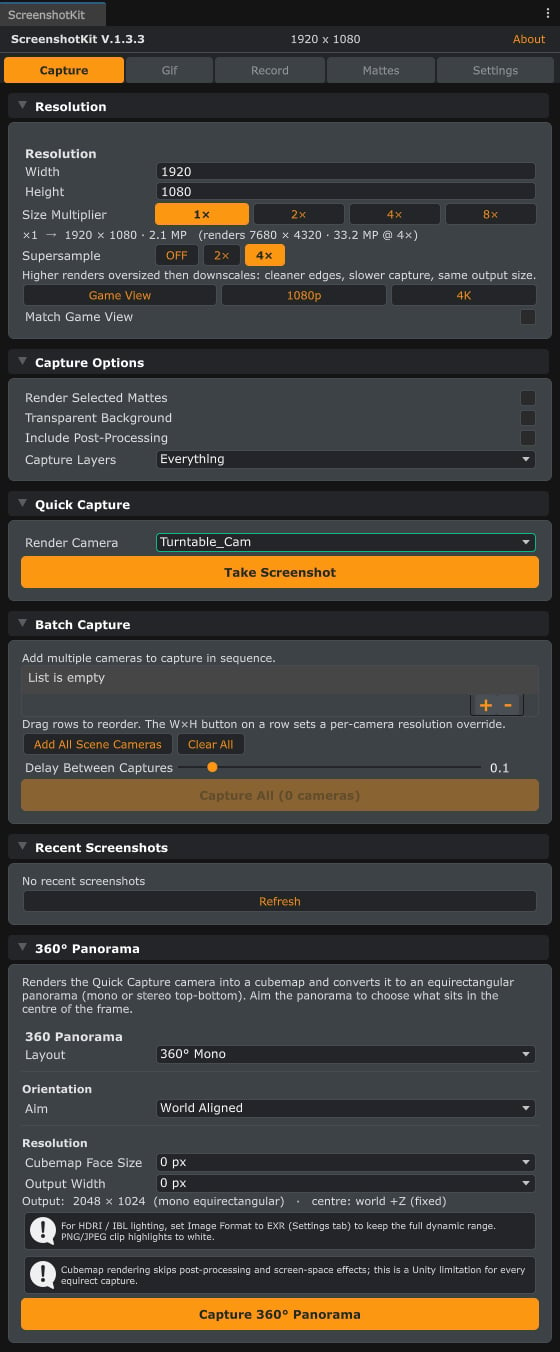
Open the window from **Tools > ScreenshotKit > Settings Window**, or click the **ScreenshotKit** toolbar overlay in the Scene View. It has five tabs:
| Tab | What it does |
| ------------ | ------------------------------------------------------------------------------- |
| **Capture** | Single screenshots, batch multi-camera capture, and 360 degree panoramas. |
| **Gif** | GIF recording and image sequence recording. |
| **Record** | MP4 (H.264) / WebM (VP8) video recording: live camera, viewport, and turntable. |
| **Mattes** | Cryptomatte segmentation, lighting decomposition, and data-buffer passes. |
| **Settings** | Output paths, filename templates, file formats, watermark, presets, shortcuts. |
 ## What you can capture
High-resolution stills up to a 132.7 megapixel budget, with 1x to 8x supersampling.
One shot from every camera in the scene, with consistent naming and optional mattes.
Alpha from Cryptomatte, post-processing, or a hybrid of both.
Mono or stereo top-bottom equirectangular panoramas, aimable from the capture camera.
Threaded GIF encoding straight from Play Mode.
Frame-by-frame stills in PNG, JPEG, TGA, or EXR, with optional per-frame mattes.
MP4 (H.264) and WebM (VP8) recording: live camera, viewport, or deterministic turntable.
Spec-compliant Cryptomatte EXRs plus 18 AOV passes for Nuke, Fusion, AE, and Resolve.
## Runtime API
Everything the window does for stills, GIFs, and sequences is also scriptable at runtime through the `DaCruz.ScreenshotKit` namespace, for in-game photo modes, automated capture passes, or build-time tooling. Start with the [Runtime API overview](/api/overview).
## ScreenshotKit Lite
Just need stills? [ScreenshotKit Lite](/screenshotkit-lite) is the free version: one-click PNG screenshots at any resolution, with presets, hotkeys, transparent backgrounds, and a thumbnail gallery. No trial limits, no watermarks.
## Get it
ScreenshotKit is available on the [Unity Asset Store](https://assetstore.unity.com/). For support and other tools, visit [daCruz.dev](https://dacruz.dev).
## What you can capture
High-resolution stills up to a 132.7 megapixel budget, with 1x to 8x supersampling.
One shot from every camera in the scene, with consistent naming and optional mattes.
Alpha from Cryptomatte, post-processing, or a hybrid of both.
Mono or stereo top-bottom equirectangular panoramas, aimable from the capture camera.
Threaded GIF encoding straight from Play Mode.
Frame-by-frame stills in PNG, JPEG, TGA, or EXR, with optional per-frame mattes.
MP4 (H.264) and WebM (VP8) recording: live camera, viewport, or deterministic turntable.
Spec-compliant Cryptomatte EXRs plus 18 AOV passes for Nuke, Fusion, AE, and Resolve.
## Runtime API
Everything the window does for stills, GIFs, and sequences is also scriptable at runtime through the `DaCruz.ScreenshotKit` namespace, for in-game photo modes, automated capture passes, or build-time tooling. Start with the [Runtime API overview](/api/overview).
## ScreenshotKit Lite
Just need stills? [ScreenshotKit Lite](/screenshotkit-lite) is the free version: one-click PNG screenshots at any resolution, with presets, hotkeys, transparent backgrounds, and a thumbnail gallery. No trial limits, no watermarks.
## Get it
ScreenshotKit is available on the [Unity Asset Store](https://assetstore.unity.com/). For support and other tools, visit [daCruz.dev](https://dacruz.dev).